Ubuntu 卸载Fcitx输入法后无法登录桌面问题解决

Ubuntu 卸载Fcitx输入法后无法登录桌面问题解决

ubuntu linux 安装搜狗拼音输入法的方法就不说了,需要依赖Fcitx。
如果想卸载fcitx和sogou拼音输入法,那么注意了,你可能回无法进入桌面系统,
具体症状是:在图形登录界面输入密码后enter,又跳回登录界面。使用CTRL+ALT+F1.正常登录,显然密码没有问题。

logo-ubuntu
原因即是:卸载不完全,导致在登录时无法正确加载输入法,准确地说是搜狗拼音输入法的残留。
解决方法:
1.切换到字符终端界面CTRL+ALT+F1..6.
2.删除/etc/X11/Xsession.d目录下的Sogou拼音配置文件。
(这块我把具体名字忘记另外,大家可以搜索grep -nr fcitx 找找)

cd /etc/X11/Xsession.d
sudo rm -f 55Sogou*[具体名字我没记下来]
cd /etc/X11/xinit/xinput.d
sudo rm -f *Sogou*[具体名字我没记下来]
sudo rm -f /usr/bin/fcitx [如果该文件存在]

3.重新登录,看是不是已经OK。

解决Mac耳机插孔无声音等问题

解决Mac耳机插孔无声音等问题

今天看到不少人遇到macbook耳机没有声音的问题,有某些人回复“灰太多,堵上插孔,用酒精擦..”这样的回答确有些可笑,排除硬件坏的原因,这里先给出正解:
Step 1. 进入系统偏好设置(System Preferences);
Step 2.进入“声音”(Sound);
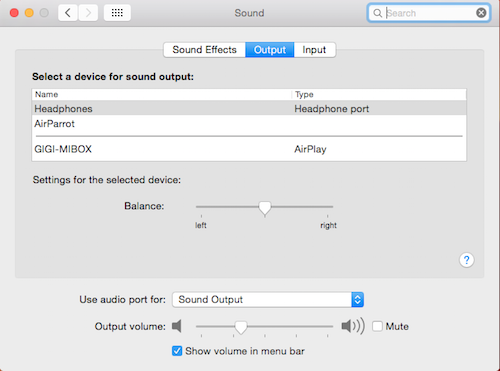
Step 3.检查该声音选项卡中“输出”(Output),插上耳机,看是不是没有自动切换到耳机口(handphone port),如果没有就手动选中,是不是OK了。
handphone分析一下原因:是不是之前装过Airplay类的软件,比如AirParrot,卸载不彻底,可以参照这里彻底卸载:

sudo rm -rf /Library/Extensions/APExtFramebuffer.kext
sudo rm -rf /Library/Extensions/AirParrotDriver.kext

另外老生常谈问题:mac或者iphone充不了电了,是因为天太冷了..这个问题在N年前在家里,由于太冷,自己发现并解决这个问题:放进被窝。
联系人不支持国外联系人,文件处理,Nfc,高级应用..要向Google多学习下了..
这里就不吐再槽苹果,但是还是要简单吐槽一下某些狂(Nao)热(Can)果粉。用了apple的产品整个人逼格都高了吗?不想用“适合就是最好”这样的词

空间不够来折腾:手机系统备份到电脑

空间不够来折腾:手机系统备份到电脑

一台手机MOTO G ,8G,装了N多App,剩余空间1G左右。motorola被联想收购后,说好的lollipop迟迟不见,CM12都出了,花儿也谢了,现在要在Moto G上安装CM 12 的android5.0,背景交代完毕。
需要备份原有官方系统以待OTA,使用CWM recovery,但是剩下空间显然不够了..
解决方案:将备份文件移出手机,待需要还原时再移回手机。

1.刷入使用第三方Recovery Clockworkmod;
2.手机上进入recovery模式,备份系统;
3.挂载/data
4.敲入命令, 进入 shell界面
adb shell

5.进入目录 ,检查CWM的备份文件

/data/media/clockworkmod/backup

该目录下是备份的文件: 如:1970-02-02.16.18.37
cwm_backup

6.将文件下载到电脑,如D盘。
adb pull /data/media/clockworkmod/backup/1970-02-02.16.18.37 D:

7.需要还原时再 adb push…

——–另外刚刚有调整了Linux 下VitrulBox 虚拟机磁盘空间,也顺便写下来,类似命令:
查看硬盘信息:

VBoxManage list hdds

如果是vmdk格式虚拟机磁盘,首先将vmdk 虚拟机磁盘格式转换为vdi,因为vmdk不可以..

VBoxManage clonehd  ././XXXX.vmdk  ././XXXX.vdi  --format vdi

然后,调整改磁盘(记下UUID)大小:

VBoxManage modifyhd  UUID --resize 409600


Goodbye to 2014 and say hi to 2015[拜拜2014,你好2015]

Goodbye to 2014 and say hi to 2015[拜拜2014,你好2015]

2014,再见[不会再见吧]!你好,2015!

一年又接近尾声,按照惯例,我会在这里辞旧迎新。稍稍缅怀,稍稍展望。
2014 这一年,发生了许多事,在我身上,我身边,还有其它地方。
回顾过去的一年,这里,那里,其它地方发生过许许多多的事情,或悲或喜,或聚或散。
无论如何,过去的,终会过去。将来的会比好更好,比逼格更逼格..
关于我的,今年发生了很多非常重大的事;我会在这里[https://www.gigiwangs.com] Po 一些上去;这是一个托管在Github的静态网站,更新很慢;尽管这里更新也很慢。我会再来这里更新这个Post。
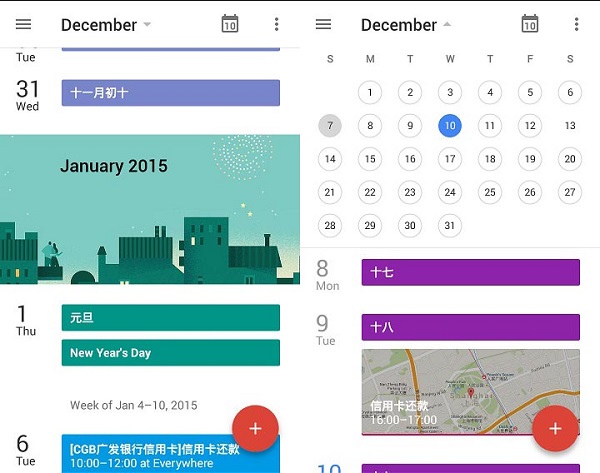
身边的事,先更新一下日历吧! 看这里为[你的日历导入中国农历Lunar Calendar];我更新了未来几年的中国农历,可以导入你的Google 日历中,方便在移动设备上查看;[话说,最近谷歌的大动作不少,Android5.0,Inbox,新版Gmail,新版日历,惊艳…]
CAL
2014/05/27 Google 全线遭到屏蔽,上网越来越艰难;
2014//,
2014年夏,发生了多起少女失踪事件;
2014年夏,巴西世界杯…;
2014年夏,广电总局放大招,针对盒子?
2014年秋,去了趟深圳,没有过深圳河,对岸…
2014年,坚挺的房地产有些痿…
2014年,所谓的反腐||斗争,这个好像不关我什么事,不提…
……..

看吧…我什么都不敢说,原谅我,大伙都懂….
总之,还是祥和的一年,大家都还好。。。
其它的,Google Zeitgeist应该在最近几天发布,到时我再来更新…如果我没来,看这里[http://www.google.com/trends/topcharts?zg=full]

Chinese Developers Can Now Offer Paid Applications to Google Play Users in More Than 130 countries

Chinese Developers Can Now Offer Paid Applications to Google Play Users in More Than 130 countries

Source:http://android-developers.blogspot.com/2014/11/chinese-developers-can-now-offer-paid.html

Google Play is the largest digital store for Android users to discover and purchase their favorite mobile app and games, and the ecosystem is continuing to grow globally. Over the past year, we’ve expanded the list of countries where app developers can sign up to be merchants on Google Play, totaling 60 countries, including Lebanon, Jordan, Oman, Pakistan, Puerto Rico, Qatar and Venezuela most recently.

As part of that continued effort, we’re excited to announce merchant support in China, enabling local developers to export and sell their apps to Google Play users in more than 130 countries. Chinese developers can now offer both free and paid applications through various monetization models, including in-app purchasing and subscriptions. For revenue generated on Google Play, developers will receive payment to their Chinese bank accounts via USD wire transfers.
Google-Play-Store

If you develop Android apps in China and want to start distributing your apps to a global audience through Google Play, visit play.google.com/apps/publish and register as a developer. If you want to sell apps and in-app products, you’ll need to also sign up for a Google Wallet merchant account, which is available on the “Revenue” page in the Google Play Developer Console. After you’ve uploaded your apps, you can set prices in the Developer Console and later receive reports on your revenue. You’ll receive your developer payouts via wire transfer. For more details, please visit ourdeveloper help center.

We look forward to continuing to roll out Google Play support to developers in many more countries around the world.

中国开发者可以向全球130个国家的Google Play用户提供付费应用啦

发表者:Ellie Powers, Google Play产品经理

Google Play是一个可让Android用户发现和购买他们喜爱的移动应用程序和游戏的全球最大的应用商店,这个生态系统在全球迅速成长。过去一年中,我们已经扩展到60个国家,让应用程序开发人员可以注册成为 Google Play的商家,其中新近支持的国家包括黎巴嫩、约旦、阿曼、巴基斯坦、波多黎各、卡塔尔和委内瑞拉。

作为持续改进 Google Play努力的一部分,我们很高兴地宣布在中国增加了对商家的支持,让中国的开发者能售卖应用程序到130个国家的 Google Play 用户。中国的开发者现在可以提供通过各种盈利模式的免费和付费应用,包括应用内购买和订阅。在 Google Play 产生的营收将通过美元电汇的方式支付给开发者的中国的银行账户。

如果你在中国开发Android应用程序,并希望通过 Google Play 把应用程序推广到全球,请登录play.google.com/apps/publish并建立你的 Google Play 开发者账户。如果你想售卖付费的应用程序和应用程序内的产品,则需要再注册一个Google 电子钱包商家帐户,通过Google Play开发者控制台里的”营收”页面进行设置。上传应用程序后,你可以通过开发者控制台设定价格,之后就可以收到营收报告,你将会通过电汇的方式获得收入。

我们将继续增加更多 Google Play 商家支持的国家,敬请关注。

eM Client-迄今Windows平台最棒的Email客户端

eM Client-迄今Windows平台最棒的Email客户端

eM Client,确实是一款Windows平台下非常棒的电子邮件客户端:精致,全能,免费!
先给出官方链接:eM Client | Best Email Client for Windows 8, 7, Vista, XP 
最近需要在windows 8.1下设置某某同学的exchange邮件账户,起初我单纯认为,windows 8 上的Mail app不正好支持exchange吗,结果设置时遇到一堆问题,总之微软官方给出解释是:因为win8证书签名问题,需要获取EWS服务证书导入到系统中。这显然要放弃,说实话,公司的IT的姿势水平呵呵吧。 搜索结果办法未果,还是换客户端吧。
Em_client_info   Outlook 直接Pass,买不起正版,虽然exchange支持好,但其他实在太烂。
Foxmail 算了吧,Exchange玩得还不怎么样,某些账号如QQMail的exchange可能还可以,但outlook web Server 测试无法成功.
Thunderbird 整体还是不错的,Exchange需要插件ExQuilla也挺完美的。
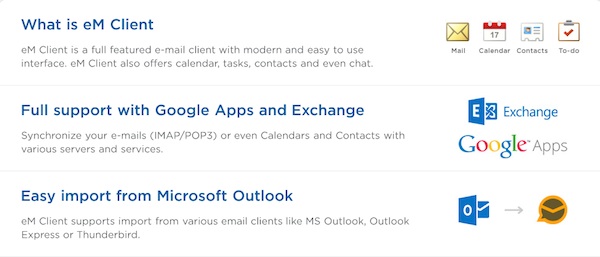
几个关键词[exchange win8 mail],Google给出的结果[eM Client],终于发现了这么棒的软件,设置完全傻瓜,支持POP/IMAP/Exchange,多种Mail,Google app,exchange,contacts,calendar 同步。具体看官方介绍吧:
eM Client | Best Email Client for Windows 8, 7, Vista, XP
em_clieanteM Client-The best mail client for windows I’ve ever used.
如果你在使用Foxmail或者Thunderbird,那么来试试eM Client,耳目一新的感觉想必是有的,能喜欢上这款客户端也是极好的。

Google日历设置信用卡还款缴费提醒

Google日历设置信用卡还款缴费提醒

任一款日历都应该有添加和设置重复事件功能,可以指定时间,周期。包括iCloud 日历,Outlook日历等,但目测和Goolge Calendar最大不同在于:提醒的方式,Google日历支持:桌面弹出(Popup),Email还有短信(SMS)的提醒方式。
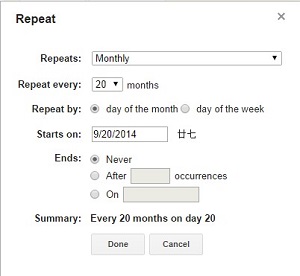
虽然可以设置多种提醒方式,但如果需要管理多张不同信用卡,贷款,水电煤等与个人征信相关的还款缴费的确马虎不得。使用Goolge日历的好处显而易见,方便快捷,安全,不限数量,甚至不需要网络支持..  google_cal设置方法非常简单,你可以新建一个日历,专门处理周期类提醒,当然也可以不建而是直接新建重复事件,选择重复日期,周期(N年,N月,N日),邀请,提醒方式…保存,即可。google_cal2
而iCloud日历和Outlook日历,就更像是一个本地日历,而已……
ICLOUD_Cal

让Windows,Linux或OSX上的Chrome像ChromeOS一样运行Android Apps

让Windows,Linux或OSX上的Chrome像ChromeOS一样运行Android Apps

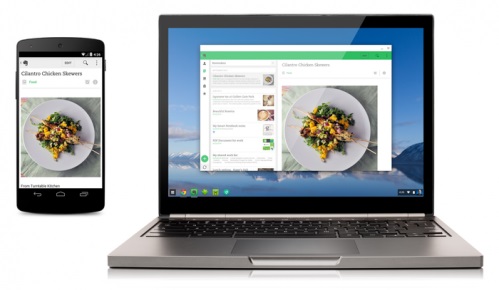
Google在今年6 月 Google I/O 大会上宣布 Chromebook 将能够运行 Android 应用。近期已经公布了首批为Chrome OS进行了适配的四个第三方应用:Evernote、 Duolingo、Sight Words和Vine。
这个项目的名称是App Runtime for Chrome(目前还在Beta阶段),以后也必然会支持越来越多的应用。但是如果你暂时没有Chromebook,或者还想体验更多的手机/平板的App,这个项目也许可以帮到你:chromeos-apk!
Yes!没错,如果你已经拥有一个Chromebook,使用它可以立即体验更多的Android App(APK).可以参看这里:https://github.com/vladikoff/chromeos-apk.
如果是PC,MAC上的chrome,就需要稍微多一点步骤:当然可以直接参看这里。
chrome_app

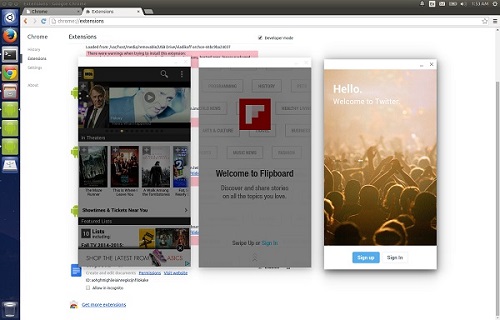
  1. ARChon runtime 可以让你在Chrome OS 或者其他平台的桌面版Chrome上使用chromeos-apk创建无无数量限制的 Android APKs。runtime 下载地址在这里:https://bitbucket.org/vladikoff/archon/get/v1.0.zip
  2. 注意:这个自定义的运行时将替换原有官方的运行时组件。当然这个ARChon runtime在桌面版的chrome还不稳定。
  3. 安装方法:和安装未打包的chrome扩展应用一致,启用开发者模式->载入未打包的扩展
  4.  安装Node.js (via http://nodejs.org/)
  5. 使用chromeos-apk 安装apk..
    chromeos-apk [path to apk file]
    手机版app :
    chromeos-apk com.soundcloud.android.apk
    平板版app :
    chromeos-apk com.soundcloud.android.apk –tablet
  6. 调整分辨率:https://bitbucket.org/vladikoff/archon/src/master/gen_main.min.js andhttps://bitbucket.org/vladikoff/archon/src/master/gen_index.min.js
    Find tablet: {"long": 1280, "short": 800}, tweak it, fit your resolution, reload the run time.
  7. 如果有问题,可以尝试更新chrome或者使用chrome candary.

qqapk慢慢折腾,尽情享受…


Install ExpressCache for SSD Caching

Install ExpressCache for SSD Caching

如果你拥有一个安装SSD的电脑,而且已经安装了Windows操作系统。如果这台电脑在出厂OEM 系统分区但都已经被你改变了或者是全新的硬盘,那么这篇文章可能适合你。文章参考自:Acer community ,原作者描述的很细致,只不过是英文。这是感谢作者MuadDib。
 1.首先,你需要ExpressCache 这个软件,某些厂商可能提供这个软件的下载,而且这款软件可能需要OEM 厂商提供的 license, 而笔记本厂商如Acer则不提供包括下载,但是貌似Lenove有下载提供。ecc
如果是Acer,那么下载下面两个文件.
ExpressCache Install: http://depositfiles.com/files/l73q0rizh
  ExpressCache Acer Files: http://depositfiles.com/files/68vvduipq
2.安装完第一个软件ExpressCache后,不要着急重启,用第二个ExpressCache Acer Files解压后的 文件替换和覆盖已安装的ExpressCache。重启,至此,ExpressCache安装完毕。
3.接下来,进行配置:
1.) 以管理员身份运行命令提示符,win8 可以按Alt+X,再按A进入,键入:diskpart.
2.) 输入 “list disk” (注意 SSD的驱动器编号 drive number ).
3.) 输入 “select disk n” (n= 驱动器编号)
4.) 输入 “clean”
5.) 输入 “exit”,退出diskpart。
6.) 到ExpressCache 安装目录. 例如输入 “cd C:\Program Files\Condusiv Technologies\ExpressCache\”
7.) 输入 “ECCmd -partition” (这个命令使 ExpressCache 使用整块 SSD )
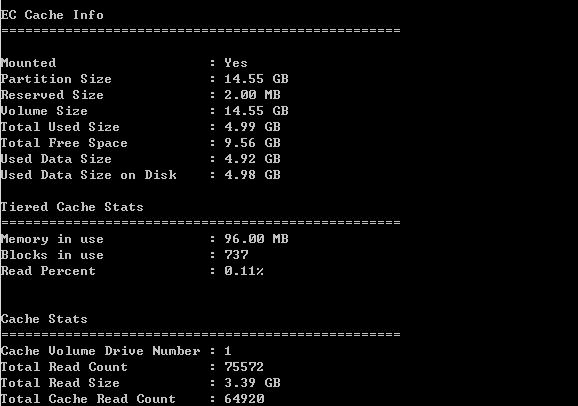
8.) 搞定! 输入 “ECCmd -info” 确认状态.

以上是仅仅启用SSD 缓存,如果需要一起安装Intel Rapid Start和ExpressCache,请参照下面的步骤,很详细,就不再照抄了。

Intel Rapid Start with ExpressCache:
1.) Open an elevated command prompt and type diskpart.
2.) type “list disk” (note the drive number of the SSD).
3.) type “select disk n” (n= the drive number found above)
4.) type “clean”
5.) type “create partition primary size=NNNN” (NNNN= the amount of memory you have in your system. So if you have 6GB’s of RAM, replace NNNN with 6000)
6.) type “detail disk” (Note the volume number of the partition that you created in step 5)
7.) type “select Volume M” (Replace M with the volume number from the previous step)
8.) type “set id=84 override”
9.) type “exit”
10.) The above steps created a hibernation partition on the SSD drive approximately equal to your RAM. Before you can Install Rapid Start, you will need to reboot the computer or else it will not install. You can do this now or after you setup ExpressCache.
11.) Installation of Intel Rapid Start is straight forward. Just download it from the Intel web site and install it. You can also refer to the Rapid Start User guide for the above steps as well as how to configure Rapid Start:
Intel Rapid Start:https://downloadcenter.intel.com/Detail_Desc.aspx?DwnldID=21612&lang=eng
12.) Now we will setup ExpressCache. Its a little trickier now that we are using Rapid Start.
13.) Figure out how much free space you have on the SSD now that the Hibernation partition is created. You need the value in MB. So for example, if you created a hibernation partition of 6000, and the total drive size is 20480, then you have 14480MB left. You can get this information easily in Disk Management (diskmgmt.msc) by right clicking the SSD drive and selecting Properties. Then go to the Volumes tab. Remember this value for later.
14.) If your elevated command prompt is not still open, open it now.
15.) Navigate to the ExpressCache directory. Do this by typing “cd C:\Program Files\Condusiv Technologies\ExpressCache\”
16.) type “ECCmd -partition X YYYYY” (X is the drive ID and YYYYY is the partition size you wish to create for ExpressCache. In other words, replace X with the drive ID from step 2 and YYYYY with the free space from step 13)
17.) Your DONE! To confirm that it is working, you can type “ECCmd -info” and ensure that it starts showing you some caching statistics.

gSoap传递结构体数组之上网不易

gSoap传递结构体数组之上网不易

每次需要用到网络,无论PC,Mac或是移动设备,一阵愤怒涌上来。Google全线被封,Dropbox被封,Line被封,Amazon WS 被封,One Drive 被封,手机上百分之八十应用挂了……就在墙内死去吧!F**k G*W!!顺便祝福Fang Sir。如今的封锁已经到了丧心病狂的地步,当局没有任何下线和尺度!我的这个日记本也快挂了。不说了,我要砸电脑了……

GFWcomic

——————图片引自http://factsanddetails.com/

现在见到最多的已经不是”Connection is reset(连接被重置)”,而是”This webpage is not available”,果然没有最牛最有最傻X。
最近用到强大的C版本gSoap库处理Web service服务端和客户端。虽然以前用过,但这次需要用到数据库,需要返回结果集,这里就直接贴出代码,分别返回单条结构体和多条的结构体数组。
接口interface.h是这样定义的:

//interface.h
//soapcpp2 -c -L -S -x  interface.h 
//soapcpp2 -c -C -L -x   interface.h 
struct  OnlWS__FuckGWResp
{
   char *Google;
   char *MrFang;
   char *GreatWall;
   char *Blocks;
   char *DnsPollution;
   char *CNShit;
};

struct  OnlWS__GetFreeNet
{
    char *Free;
    char *FreeAgain;
    char *FreeEver;
};

struct OnlWS__GetFreeNetResp
{
    struct OnlWS__GetFreeNet * __ptr;
    int  __size;
}; 
int OnlWS__GetShitGW(char *option,struct OnlWS__FuckGWResp  *resp);
int OnlWS__GetFreeInfo(char *option,struct OnlWS__GetFreeNetResp  *resp);

接口定义好后使用gsoap提供的工具生成服务端代码:

soapcpp2 -c -L -S -x  interface.h

接下来实现服务端代码和接口的逻辑:(略去一些代码),接口处理逻辑需要返回结构体数组,因此需要开辟一定长度的空间,这里使用链表来动态开辟。

    //........
    resp->__size=nRecCnt;
    resp->__ptr= soap_malloc(soap,(resp->__size+1)*sizeof(*resp->__ptr));
    
    pLink->ptAnyNode= soap_malloc(SOME_DATA_STRUCT);
    pLink->pNext=NULL;
    tAnyLink *p ,*phead=pLink;
    for(i=0;i<resp->__size-1;i++)
    {
        p=(tAnyLink *)soap_malloc(soap,sizeof(tAnyLink));
        p->ptAnyNode=(SOME_DATA_STRUCT *)soap_malloc(soap,sizeof(SOME_DATA_STRUCT));
        p->pNext=NULL;
        phead->pNext=p;
        phead=p;
    }

进行赋值操作,返回结果。

客户端实现比较简单,因为可以直接取到结构体数组的长度,直接使用数组下标即可获取到结果。这里列出Python的测试程序:使用suds 包来完成客户端处理web service .

# -*- coding: utf-8 -*-
import suds
import logging
import sys

def main():
    print sys.stdout.encoding
    url="http://192.168.101.181:11080" 
    client=suds.client.Client(url)
    rst=client.service.GetShitGW('WALL')
    print client.last_received()
    rs=client.service.GetFreeInfo('FREE')
    print rs
    print client.last_received()
    
if __name__=='__main__':
    main()


看看返回的情况:

(GetFreeNetResp){
   item[] = 
      (GetFreeNet){
         Free = "01"
         FreeAgain = "A"
         FreeEver = "2014-07-18 07:37:51.110000"
      },
      (GetFreeNet){
         Free = "10"
         FreeAgain = "B"
         FreeEver = "2014-07-18 07:37:51.110000"
      },
      (GetFreeNet){
         Free = "15"
         FreeAgain = "G"
         FreeEver = "2014-07-18 07:37:51.110000"
      },
      (GetFreeNet){
         Free = "20"
         FreeAgain = "C"
         FreeEver = "2014-07-18 07:37:51.110000"
      },
 }

好了,上网不易,且行且珍惜。